
Symbioza
Menu

Workloads / examples

Bring the work.
Take home the result.

Fine-tuning, evaluations and batch inference. Your code does the work; Symbioza handles the cloud execution within your spending limit.

Demos

Real things agents did with Symbioza.

Each one was asked for in a chat, estimated, approved with a spending limit and run. The files came back.

Four stills from the demo video: the 2D Symbioza logo, the TripoSR result, the TRELLIS result and the refined model

Featured · Logo → 3D

One logo.
One ChatGPT conversation.

The agent handed the heavy 3D work to Symbioza as GPU jobs and brought real meshes back into the chat.

ChatGPTImage → 3DMeshes + renders
  1. 01OriginalThe Symbioza mark, a 340-pixel image.
  2. 02TripoSRA first 3D reconstruction, run as a GPU job.
  3. 03TRELLISA better model from three seeds, run as a GPU job.
  4. 04RefinedThe kept mesh, finished by hand in Blender.

The video is an edited progression of the four stages, not a recording of the generation. The refined stage was local Blender work, not GPU compute.

Command-center render, frame 540: an agent orb on a glowing pedestal, light arcs running to server cabinets

Blender benchmark

A 3D command center: 3 of 540 frames.

An agent asked for timeline frames 1, 270 and 540 of an 18-second shot. They came back as 1920×1080 PNGs with the editable .blend.

Agent over MCPBlender Cycles renderPNG frames + .blend

A 3-frame benchmark. The full 540-frame film has not been rendered.

Complete jobs

Three specs you can estimate as they are.

Each spec is published as it is, with a pinned script, pinned inputs and a license for every input. Not connected yet? Connect your agent and sign in. Estimates are free once you are signed in, and running a job needs prepaid credit.

An estimate is free and needs no limit: it gives the likely cost, its range and the expected runtime when anything about the job predicts them, or the price of each hour of running when nothing does. Your limit is the hard maximum: it sets the latest the run can stop, and you are never billed more than it.

01 /

Check the whole path first.

A short first job. It confirms PyTorch sees a GPU and computes a seeded matrix multiply correctly against a float64 reference. You see the estimate, the spending limit, the charge and the delivered files, end to end.

No inputs · seeded random data
WHAT YOU GET BACK IN /workspace/artifacts/gpu-check.json · SHA256SUMS
A DELIVERED RUN OF THIS SPEC · 2026-09-29charged $0.05 (provisional) under a $0.50 spending limit
ok: true · float32 relative error 1.05e-6 · float16 4.5e-4 · 2 of 2 files delivered
ESTIMATE FIRST
02 /

Upscale an image 2×.

Real-ESRGAN enlarges a public-domain photo to twice its size. You get the image, a side-by-side comparison and a report listing every input with its source, license and sha256. The job checks each input's hash before using it.

Public-domain photo · Real-ESRGAN x2plus weights · BasicSR code (Apache-2.0)
WHAT YOU GET BACK IN /workspace/artifacts/upscaled-x2.png · comparison.png · report.md · report.json
ESTIMATE FIRST
03 /

Train while you’re away.

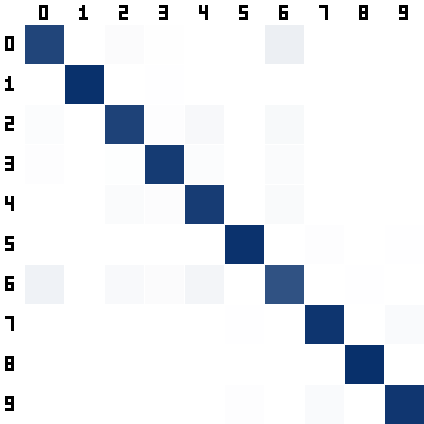
A small image classifier trains on Fashion-MNIST with no one watching. It saves a checkpoint after every epoch, then the final model, per-epoch metrics and a confusion matrix. The spending limit bounds what the run can cost.

Fashion-MNIST (MIT) · pinned by sha256
WHAT YOU GET BACK IN /workspace/artifacts/model.pt · checkpoint.pt · metrics.csv · confusion_matrix.png · results.json
A DELIVERED RUN OF THIS SPEC · 2026-09-29charged $0.06 (provisional) under a $1.50 spending limit
15 of 15 epochs · test accuracy 0.946 · 7 of 7 files delivered
Confusion matrix from this run: test-set counts, true class by row, predicted class by column
ESTIMATE FIRST
Then bring a workload you own. These are planning prompts, not ready-made containers or benchmark results. Bring working code and accessible data; your agent helps prepare the request.
01 /

Fine-tune your model.

Bring a training script, a compatible container and a dataset you can use. Get the resulting weights and metrics back.

Training code · model access · dataset
WHAT YOU ASK YOUR CODE TO SAVEmodel weights + training metrics

Your container must include your code. Resuming training requires checkpoint save-and-resume support in your command.

ESTIMATE FIRST
02 /

Put a model to the test.

Run your evaluation harness against a defined dataset. Save a machine-readable report so you can compare the results.

Evaluation harness · model · test data
WHAT YOU ASK YOUR CODE TO SAVEmetrics.json + evaluation report

Record model, dataset and code versions for repeatable comparisons. Hardware-sensitive comparisons need additional validation.

ESTIMATE FIRST
03 /

Work through the whole dataset.

Run batch inference using your own model and code. Point the job at the input data and collect the processed output.

Inference code · model · input data
WHAT YOU ASK YOUR CODE TO SAVEpredictions.csv + processing summary

Size disk space for input, extracted data and outputs. Use dataset links that stay valid long enough for staging.

ESTIMATE FIRST

Copy a prompt to start a conversation with your agent.

Before you hand it off

Give the run a clear finish.

Know what success looks like before compute starts.

Put the check in your command.

Validate the output, return a meaningful exit code and save the files you need under /workspace/artifacts/.

Check the outcome in three parts.

Read the run status, file delivery status and billing status separately. A completed command alone does not confirm delivery or a final charge.

The next step is a price.

Connect your agent and ask for an estimate. An estimate is free and books no compute.